



Frequently asked questions about the webmail switch to OfficeMail
Frequently asked questions about the webmail switch to OfficeMail
Since September 2026, OfficeMail has been the webmail at FireStorm. It has replaced the previous webmail (Roundcube or Horde) on all hosting servers. Here you will find answers to the most frequently asked questions about the switch.
Why do I see a new webmail?
The previous webmail has been replaced by OfficeMail: a complete online workspace in your browser with e-mail, calendar, contacts, tasks, files and office documents in one place. The Free package is included with every mail and web hosting, so there are no additional costs for you. If you open the old webmail address, you are automatically taken to OfficeMail.
Will the old webmail (Roundcube/Horde) come back?
No. Roundcube and Horde are no longer offered on our servers and are no longer supported. OfficeMail is the complete replacement.
How do I log in?
Open the address webmail.yourdomain.ch in your browser (for example webmail.example.ch) and log in with your full e-mail address and your existing e-mail password. There is no separate OfficeMail password, and you do not have to install or order anything.
Was my data taken over?
Yes. Contacts, calendars and signatures from the old webmail were taken over automatically. Your e-mails are stored on the mail server anyway and are fully available.
I cannot see all my e-mail folders. Where are they?
All your folders are still there, they may just not be displayed. Two quick steps help:
- Subfolders are collapsed by default. Click the small arrow in front of a folder name to expand them.
- Open the settings (gear icon in the top right), choose the E-mail section and remove the tick at “Show subscribed folders only”. Then log out and log in again.
Do I have to adjust my mail client or phone?
No. Mail clients such as Outlook, Thunderbird or Apple Mail as well as smartphones and tablets are not affected by the switch and continue to work unchanged. The switch only concerns the web interface in the browser.
Where do I set my signature to appear above the reply?
Open the settings (gear icon), section E-mail, and adjust the options for replying and the signature position there. You will also find further display options such as sorting.
Can I still use Roundcube?
As the webmail of our servers: no. However, you can install Roundcube at your own responsibility as a regular web application in your own webspace (for example via the app installer in Plesk). Please note: installation, updates and securing it are then entirely up to you, and our support does not cover this self-hosted installation. In the Roundcube configuration, enter your server host name with the SSL ports as connection details (IMAP port 993 and SMTP port 465, each with ssl://).
What does the yellow message «This email might be a phishing attempt» mean?
This message does not come from the spam filter. OfficeMail shows it, for example, when the visible text of a link does not match the actual target address. This also happens with genuine e-mails, for instance when a sender uses tracking or redirect links. The message is therefore just a reminder to be careful: check the sender and, if in doubt, do not click on links. Adding a sender to the spam filter’s allow list does not change this message. The allow list only helps when genuine mails end up in the junk folder.
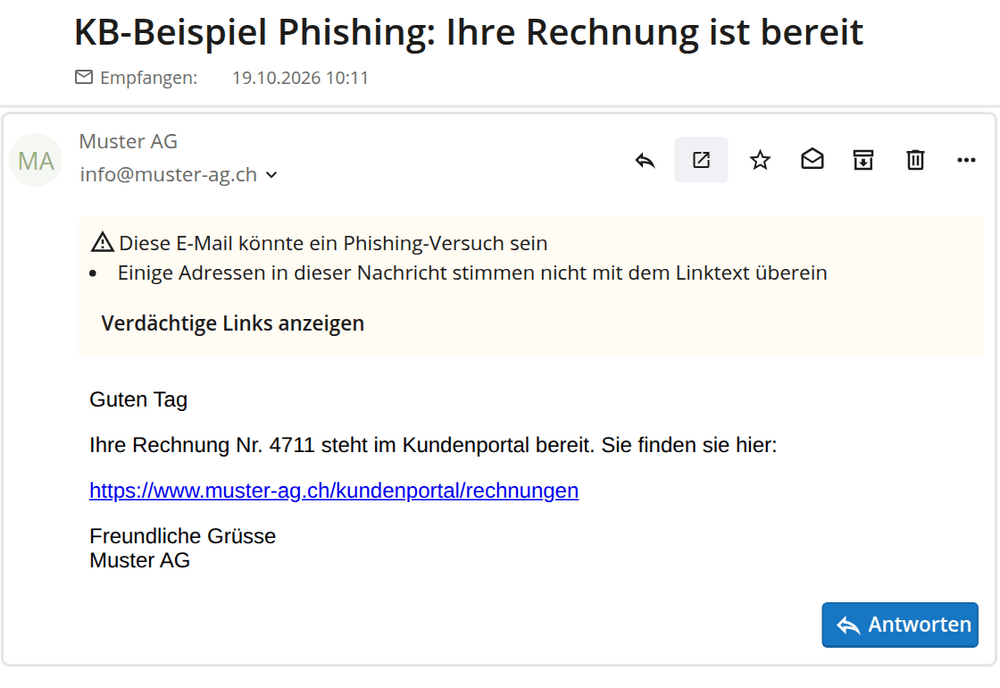
The notice appears above the message text. The button below it shows you which links are meant
It is similar with the notice «Signature unverified» for an S/MIME signature. It only means that OfficeMail could not verify the sender’s digital signature.
Does OfficeMail send read receipts?
No, never on its own. If a sender asks for a read receipt, OfficeMail shows a notice at the top of the message. A confirmation is only sent if you click «Notify the sender» there.
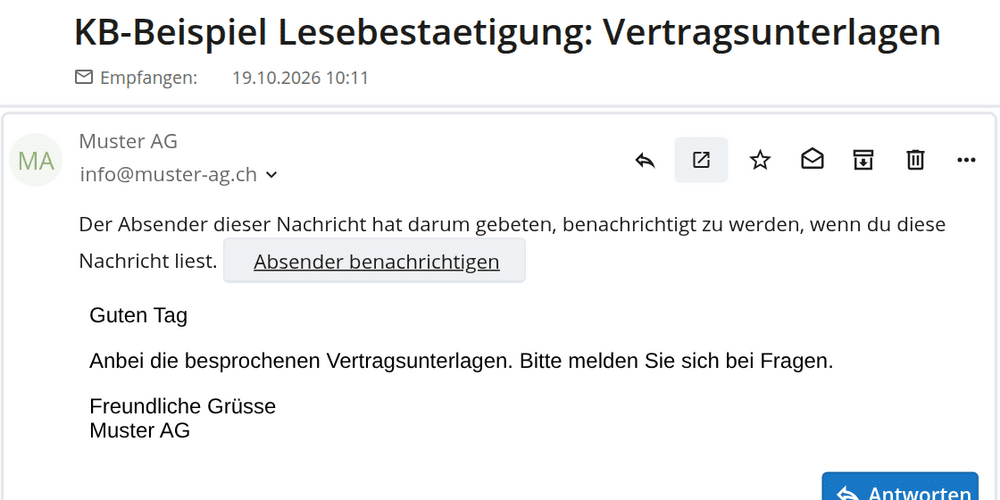
Without a click on «Notify the sender» the sender receives nothing
If you want to request a read receipt yourself, open the menu with the three dots next to «Send» while writing and switch on «Request a read receipt». The option only applies to that one message.
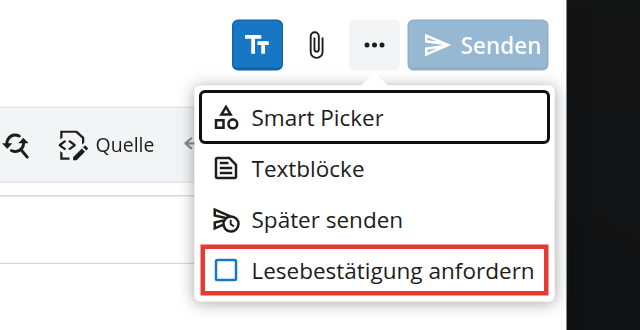
The option «Request a read receipt» in the menu next to «Send»
How do I get more space in a small window?
- Collapse the folder list: The icon to the left of the search field, above the message list, hides the folder list. The message list and the message then get the full width. The same icon brings the folders back.
- Zoom out: Hold Ctrl (Mac: cmd) and press the minus key once or twice. Ctrl and 0 returns you to the normal size.
- Install as a separate app: In Google Chrome and Microsoft Edge an install icon appears on the right of the address bar. OfficeMail then opens in its own window without address bar and tabs and can be started from the taskbar. On company PCs this function may be blocked by the IT department.
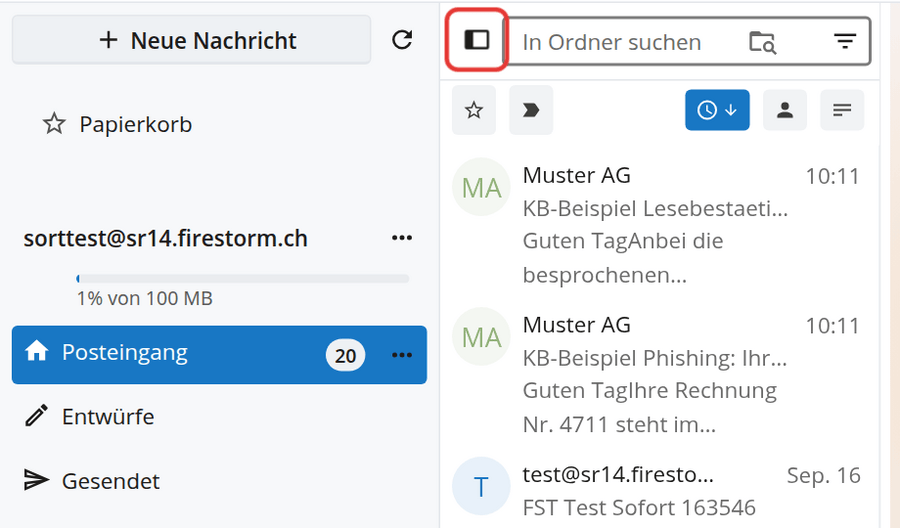
The highlighted icon hides and shows the folder list
Where do I find a guide to OfficeMail?
You will find a detailed guide in the KB article Using OfficeMail and an overview of all features in our news post OfficeMail: e-mail, calendar, files and office in the browser.