New: OfficeMail, your workplace in the browser
Mail in the webmail, the calendar on your phone, files in some cloud and Office only on the one computer it is installed on: that is what everyday life with a mailbox often looks like. From now on, every mailbox at FireStorm comes with OfficeMail: a complete online workplace in your browser with email, calendar, contacts, tasks, files and Office documents in one place. Open it at webmail.yourdomain.ch/office and sign in with your email address and mail password. There is nothing to install and nothing to order, the Free package is included with every mail and web hosting.
OfficeMail replaces the previous webmail. Anyone opening the old webmail address is taken to OfficeMail automatically. We have carried over your contacts, calendars and signatures from the old webmail. Mail clients, phones and tablets are not affected and keep working as before.






How it works
Open webmail.yourdomain.ch/office in your browser, where yourdomain.ch is the domain of your email address, for example webmail.example.ch/office. Sign in with your full email address and your mail password, the same one you use in your mail client. The bar at the top switches between mail, contacts, calendar and files. The inbox groups conversations, you mark emails with coloured tags and find them again instantly with the search. Your signature and out-of-office reply are set up right in OfficeMail. You can now give the out-of-office reply an end date, after which it switches itself off again.
 The OfficeMail inbox with conversations and tags
 The OfficeMail inbox with conversations and tags
Calendar and contacts, in sync with your phone
Create appointments in the browser and they appear instantly on your phone, tablet and in Outlook, because the calendar lives on the mail server. The same works the other way round. Sort contacts with phone, address and photo into contact groups such as “Customers” or “Club”, and OfficeMail suggests the right address while you write an email.
The calendar in week view, the same appointments as on your phone
 The calendar in week view, the same appointments as on your phone
Files and Office documents
Documents and photos live in the cloud storage of your mailbox. Share any file or folder by link. Open and edit Word, Excel and PowerPoint files directly in the browser, together with others at the same time, with no software on your computer. Changes are saved automatically. In the Free package, editing is limited to a few documents per day, from Solo it is unlimited. Viewing always works.
A Word document, opened and edited in the browser
 A Word document, opened and edited in the browser
Packages per mailbox
Free comes with every mailbox. If you need more, pick a larger package directly in OfficeMail via the Upgrade menu:
- Free, free of charge: 100 MB cloud storage, email, calendar, contacts, tasks, share files by link, edit Office documents with a daily limit
- Solo, CHF 3.00 per month: mailbox +50 GB, 5 GB cloud storage, unlimited Office editing, bookmarks for all browsers, ticket support
- Standard, CHF 5.00 per month: mailbox +100 GB, 25 GB cloud storage, file sync for PC, Mac and phone, password manager, chat and video for up to 4 people, phone support
- Premium, CHF 7.00 per month: mailbox +150 GB, 100 GB cloud storage, add up to 5 more mailboxes, video with guests by link, priority support
Prices in CHF per mailbox and month incl. VAT, cancel monthly. An upgrade takes effect immediately and is billed with your hosting. For teams with multiple users, groups and up to 20 TB of storage there is the Business Cloud.
The packages Free, Solo, Standard and Premium, selectable directly in OfficeMail
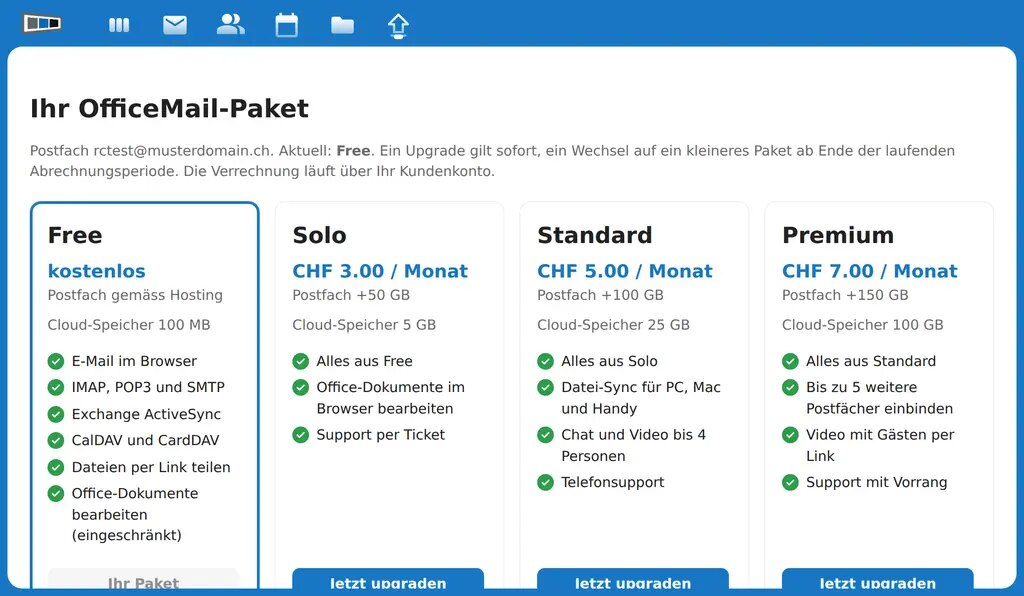 The packages Free, Solo, Standard and Premium, selectable directly in OfficeMail
Who benefits
Anyone who wants to read their mail on the go or on someone else’s computer without setting anything up. Clubs and small businesses that want to edit a document together or pass on photos by link without buying an extra cloud or an Office licence. And anyone who would rather keep calendar and contacts on their own mail server in Switzerland than with a corporation abroad.
A step-by-step guide to all features is in the knowledge base article Using OfficeMail, all details and prices are on the mail hosting page.
You will find answers to the most frequently asked questions about the switch from the previous webmail in the KB article Frequently asked questions about the webmail switch to OfficeMail.