




New: You Decide What Your Credit Is Used For
Until now, the credit in your customer portal was automatically applied to every new invoice, whether it was a domain renewal, web hosting or a server. If you had topped up your credit for one specific purpose, for example domains, you had to keep an eye on the other invoices. From now on you decide what your credit is used for: with six switches on the credit page, one per product category.

Domains, web hosting and e-mail, servers, Microsoft 365, SSL certificates and other products. You switch each category on or off individually.

Items in disabled categories remain open. Your credit stays available for the categories you have enabled.

On invoices with items from several categories only the enabled share is covered by credit. You pay the rest as usual.

The setting applies immediately to new invoices and to the automatic application before the due date. Default: everything enabled.
How it works
1. Open the credit page. Log in to the customer portal and open Invoices > Add Funds. Below the top-up form and the points alert you will find the new panel “Use credit for”.

The credit page with the new panel
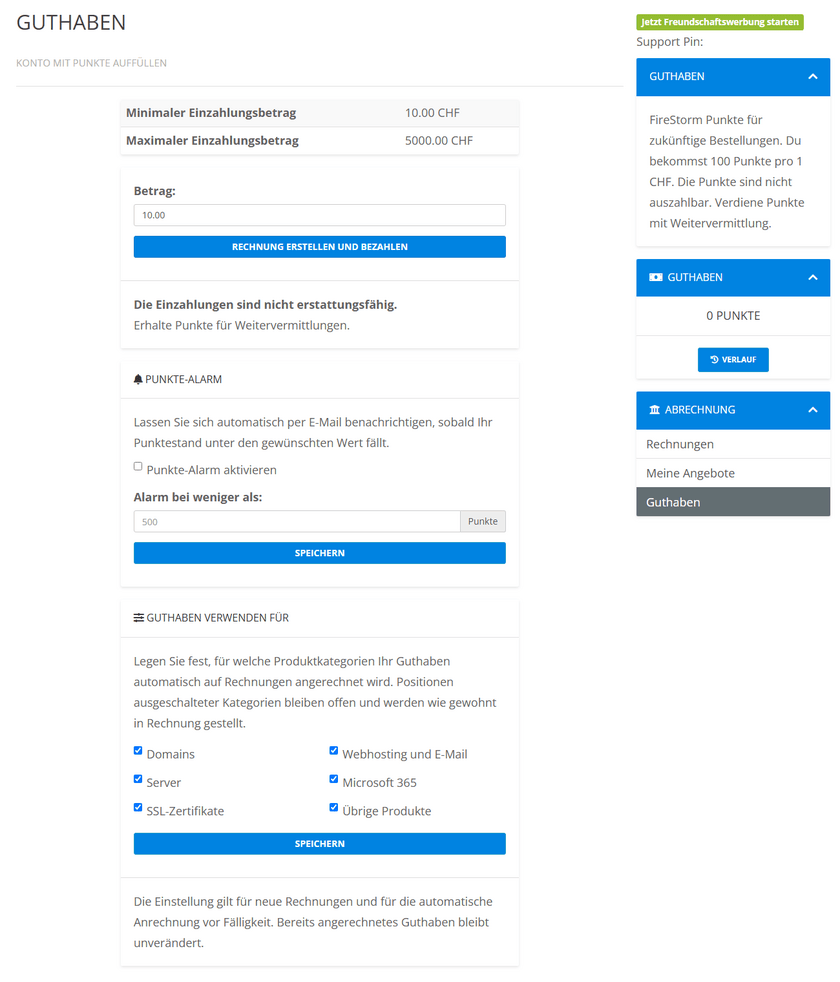
2. Choose the categories. Untick every category your credit should not be used for and click Save. Everything that stays ticked is paid with credit automatically, as before.

Here the credit stays reserved for domains, SSL certificates and other products
3. Done. The rule applies from now on to all new invoices and to the automatic application shortly before the due date. On an invoice with items from several categories only the enabled share is covered by credit, the rest remains open and you pay it as usual.
Good to know
By default all categories are enabled, so nothing changes as long as you do not change anything. Credit that has already been applied is not affected. For customers with a domain reseller package “Domains” always stays enabled, because domain renewals are settled directly from the credit.
Who benefits
Everyone who tops up credit for a specific purpose: domain resellers who cover their renewals with it, agencies that manage domains for clients and prefer to pay hosting invoices by bank transfer, or anyone who simply wants to keep track of what their credit is used for.
You will find the step-by-step guide in our knowledge base: Set credit rules