Windows Server 2025 Now Live
Windows Server 2025 is now running on all of our Windows hosting servers. The switch is complete, every server is activated and in production use. Nothing changes in how you use your hosting, but you automatically benefit from everything the new server version brings.
Windows hosting differs from Linux hosting in one decisive way: it brings a whole set of technologies that simply don’t exist on Linux, above all .NET, ASP.NET, Microsoft SQL Server and tight integration with Internet Information Services (IIS). If you run custom software, an ERP system or a specialised application that was originally built for Windows, you usually can’t get around this combination. In this article we’ll show you in detail what’s new in Windows Server 2025, which Windows-exclusive features your Plesk hosting brings, what else is included in the package, and how you stay in full control of your website even without your own RDP access. At the end, we’ll also let you know that Windows Server 2025 is now available for our vServers too.
What’s new in Windows Server 2025?
Windows Server 2025 is Microsoft’s current server release and succeeds Windows Server 2022. For everyday hosting, these are the changes that matter most:
- Hotpatching: a large share of the monthly security updates can now be installed without rebooting the server. Until now, every security update meant a reboot and therefore a maintenance window, however short. With hotpatching, the patch is applied directly into the running operating system memory. That noticeably shortens maintenance windows and significantly cuts the number of reboots needed over a year.
- Improved security: Windows Server 2025 brings stronger protection against common attack patterns such as pass-the-hash and Kerberoasting, plus a reworked SMB protocol where encryption and signing are enabled by default instead of needing to be switched on manually. Windows Defender has also been extended and now detects additional attack patterns in real time.
- Better performance: numerous optimisations have been made to the ReFS file system and the network stack. In practice this is most noticeable under heavy concurrent load, for example when several websites or a busy web application run on the same server: throughput increases noticeably while response times drop.
- Longer support: Microsoft will keep Windows Server 2025 supplied with security updates until at least 2034. Your hosting therefore stays on a current, supported version for many years to come, with no major version change on the horizon.
- More modern container and cloud foundations: Windows Server 2025 ships with updated container images and better Hyper-V integration, which matters most for Docker applications on Windows, covered in more detail further down.
Most of these improvements work in the background. There’s nothing for you to configure or change, your web hosting simply keeps running on a more modern, more secure and faster foundation.
Windows-exclusive features: what Windows hosting can do that Linux can’t
The biggest difference between Windows and Linux hosting doesn’t show up in the Plesk panel itself, which looks very similar on both platforms, but in the underlying technology. If you run a Windows-specific application, you’ll find the full Microsoft stack with us:


This combination of IIS, .NET, MSSQL and ODBC is the main reason many customers deliberately choose Windows hosting over the cheaper Linux hosting: their software depends on exactly these Windows technologies and simply can’t run on Linux, or only with major effort.
Everything else included in your Windows hosting with Plesk
Your Windows hosting is still managed through Plesk, the proven control panel for your website. With Windows Server 2025, Plesk runs the current version and, in addition to the Windows-specific features, comes with a whole range of further tools already included in your hosting package.
 Your Plesk customer area: every tool at a glance, right in your browser.
 Your Plesk customer area: every tool at a glance, right in your browser.
Plesk Web Builder: build your own website with zero coding
Right in your customer area, under “Get Started”, you’ll find the Plesk Web Builder tile. It lets you build your own website on a building-block principle, with zero lines of code. After starting, you choose whether the AI Website Generator should automatically build a site for you based on a few details, or whether you’d rather pick from over 150 professional templates yourself, sorted into categories such as Business, Food & Beverage, Health, Portfolio or Blog.
Over 150 templates to choose from, sorted by category, from food and beverage to health to portfolio.
 Over 150 templates to choose from, sorted by category, from food and beverage to health to portfolio.
Once you’ve picked a template, you land straight in the visual website editor: edit text, images, buttons and entire sections with a click, and drag new elements such as image galleries, tables, sliders or a contact form straight from the toolbar on the left into the page. The preview shows you at any time how your website looks on desktop, tablet and smartphone, before you publish it.
The visual editor: edit text, images and entire sections with a click, add new elements by drag and drop.
 The visual editor: edit text, images and entire sections with a click, add new elements by drag and drop.
This is a great fit for a quick company website, a landing page, or a simple web presence you want to maintain yourself without getting into a larger CMS like WordPress.
WordPress Toolkit: the most convenient way to run WordPress
If you’d rather run WordPress, the WP Toolkit gives you an extensive tool right inside the panel: installation in a few clicks, automatic or manually triggered updates for WordPress, themes and plugins, a security scan against known vulnerabilities, staging environments for risk-free testing of changes, plus cloning and syncing multiple installations. The WP Toolkit is one of the most widely used tools in Plesk overall and runs just as reliably on Windows as it does on Linux.
The WP Toolkit: install, update and secure WordPress, all in one place.
 The WP Toolkit: install, update and secure WordPress, all in one place.
Node.js Toolkit and .NET Site: deploy modern applications directly
For JavaScript applications, the Node.js Toolkit is available: choose the Node version, set the startup file, configure environment variables, and start and monitor the application directly from Plesk. On top of that, the .NET Site tile lets you set up a standalone .NET application, independent of a classic ASP.NET website, ideal for APIs, microservices or standalone backend services.
The Node.js Toolkit: manage version, startup file and environment variables right in the panel.
 The Node.js Toolkit: manage version, startup file and environment variables right in the panel.
Deploy via Git: deployment straight from the repository
Deploy via Git connects your project repository directly to your hosting. A push to the chosen branch is enough, and Plesk automatically pulls the latest version onto the server, including optional deployment actions such as running a build script. This fully replaces manual FTP uploads and works just as well with a classic ASP.NET project as with a Node.js or PHP application.
Connect a Git repository, and every push lands on your website automatically.
 Connect a Git repository, and every push lands on your website automatically.
Security, backup and monitoring
Your Windows hosting is also well equipped when it comes to security: Let’s Encrypt issues free SSL certificates automatically and renews them, and Sectigo SSL or SSL It! are available as alternatives if you prefer a commercial certificate. The Repair Kit automatically detects and fixes common configuration issues. Backup & Restore right inside the panel takes care of data backup, while Monitoring and Grafana give you an overview of server load at any time. PageSpeed Insights also shows you how fast your website actually loads and where there’s still room for optimisation.
Domains, containers and more
The DNS Manager lets you manage your domains’ DNS records conveniently in the same panel as your hosting. If you work with containers, Docker lets you run containerised applications directly on the server, handy if you already have containerised workloads in use or want to test an application without directly changing the server environment.
All of these tools, from Windows-specific technologies like ASP.NET and MSSQL to cross-platform ones like WordPress and Git, are already included in your hosting and waiting for you in your Plesk customer area.
Full control, even without RDP access
A Windows server can traditionally be remote-controlled via Remote Desktop (RDP), just like sitting in front of it. On our Windows hosting with Plesk, RDP isn’t available for security reasons, an open Remote Desktop port would simply be an unnecessary attack surface on a server hosting multiple customers. Many people ask themselves: how do I get to my files, how do I set up an automated task, without connecting directly to the Windows desktop? The answer: through Plesk, right in your browser.
Managing files without Remote Desktop
The File Manager in Plesk largely replaces Windows Explorer. You can upload, edit, extract, compress and move files between folders, set permissions and even edit text files directly in your browser, all without client software and without an RDP connection.
The File Manager in Plesk: manage files just like Windows Explorer, right in your browser.
 The File Manager in Plesk: manage files just like Windows Explorer, right in your browser.
Scheduled tasks instead of Task Scheduler
Recurring jobs, normally set up through Windows Task Scheduler, can also be managed comfortably in Plesk. Under “Scheduled Tasks” you decide which script, URL or PowerShell command should be called automatically and when, for example for a daily data sync, an automatic backup of your application, or a nightly maintenance run for your MSSQL database.
Scheduled Tasks in Plesk: set up automated workflows without any Task Scheduler.
 Scheduled Tasks in Plesk: set up automated workflows without any Task Scheduler.
In short: everything you’d otherwise need RDP for, like managing files, scheduling tasks, maintaining MSSQL and MySQL databases, setting up SSL certificates, or restarting a .NET application, you handle directly in Plesk. That’s not just simpler, it’s also more secure, since your server never needs an open Remote Desktop port that could be attacked.
Windows Server 2025 now available for our vServers too
If you’d rather have full root access and direct control over the server instead of shared Plesk hosting, Windows Server 2025 is now available as a template for our vServers as well. When ordering a Rootserver (VM), simply select Windows Server 2025 Standard directly as the installation in the order form.
Windows Server 2025 as an installation template for our vServers: selectable right at checkout.
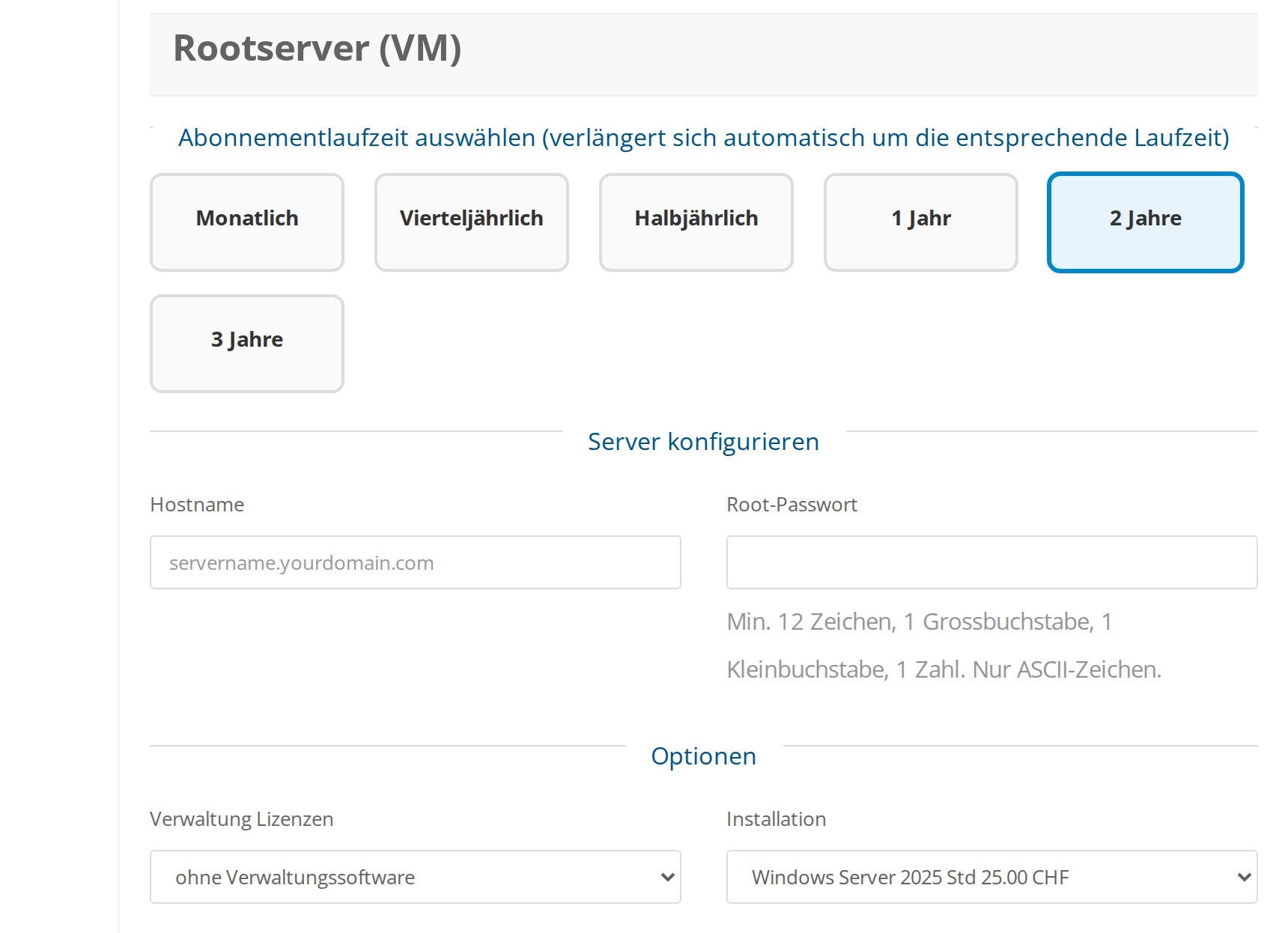 Windows Server 2025 as an installation template for our vServers: selectable right at checkout.
A vServer is the right choice when you need full control over your system, for example for your own applications, specialised software, custom IIS configuration, or when you want to configure your server entirely to your own liking, including RDP access. Plesk can optionally be added here too as a management interface, if you want to combine the convenience of the panel with the freedom of your own server.
Conclusion
With the move to Windows Server 2025, your Windows hosting is right up to date: more security, better performance and support until at least 2034 are all included, without anything changing for you. At the same time, Windows hosting at FireStorm brings everything pure Linux hosting can’t: ASP.NET, Microsoft SQL Server, ODBC connectivity and dedicated IIS application pools, combined with convenient tools like the Plesk Web Builder, the WordPress Toolkit, Node.js, Git and much more. Whether with Plesk hosting and zero technical effort, or a vServer with full root access, Windows Server 2025 is available to you either way.
Questions about the switch or about the right solution for your project? Our support team is happy to help, just open a ticket via our ticket system.