




New: adjust PHP settings per domain yourself
Enable error messages for debugging, give a plugin more memory or allow larger uploads: until now this took a request to support. From now on you adjust selected PHP settings yourself in the hosting management, per domain and active within a minute.

Switch display_errors, log_errors and error_reporting on or off with one click.

Set memory_limit, upload_max_filesize, post_max_size, runtimes and time zone yourself.

Every change is logged. “Restore defaults” takes you back to the plan value.

disable_functions, open_basedir and other protective values remain fixed.
How it works
Open the hosting management (Plesk), select the domain under “Websites & Domains” and click “PHP Settings” in the developer tools group right next to “PHP”. Set the values you need and save. The change is applied in the background and the page shows you the status. Fields left empty mean: the value of your plan applies. With “Restore defaults” you are back to the initial state at any time.
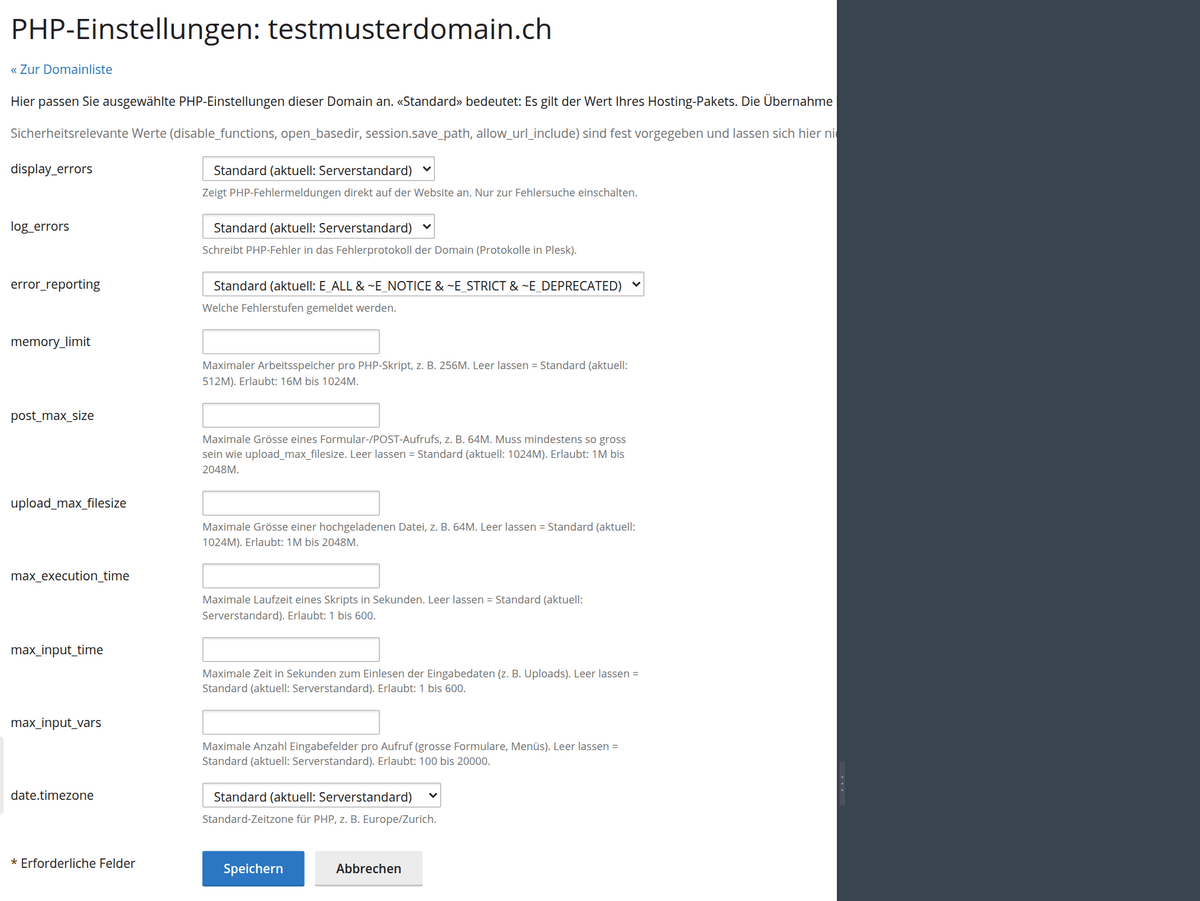
The PHP settings of a domain in the hosting management
What stays the same
Security-related values such as disable_functions, open_basedir, session.save_path and allow_url_include remain fixed. Size and time values have an upper limit per plan, shown directly in the form. This keeps your hosting protected, even if a plugin would like more. The feature is available on the Linux web hosting servers.
Who benefits
Everyone with web hosting at FireStorm: agencies and developers who want to see error messages immediately while debugging, shop and WordPress owners whose plugins need more memory or larger uploads, and resellers whose customers now handle such adjustments themselves.
You find the step-by-step guide in the article Adjust PHP settings per domain.