



FireStorm ExecGuard - Server Execution Protection
Have you ever been frustrated that unauthorized programs can be executed on your servers? With FireStorm ExecGuard, that's a thing of the past. For Linux servers (Ubuntu 22.04/24.04) and Windows servers (2019/2022/2025) with Plesk.
Real-time Process Monitoring
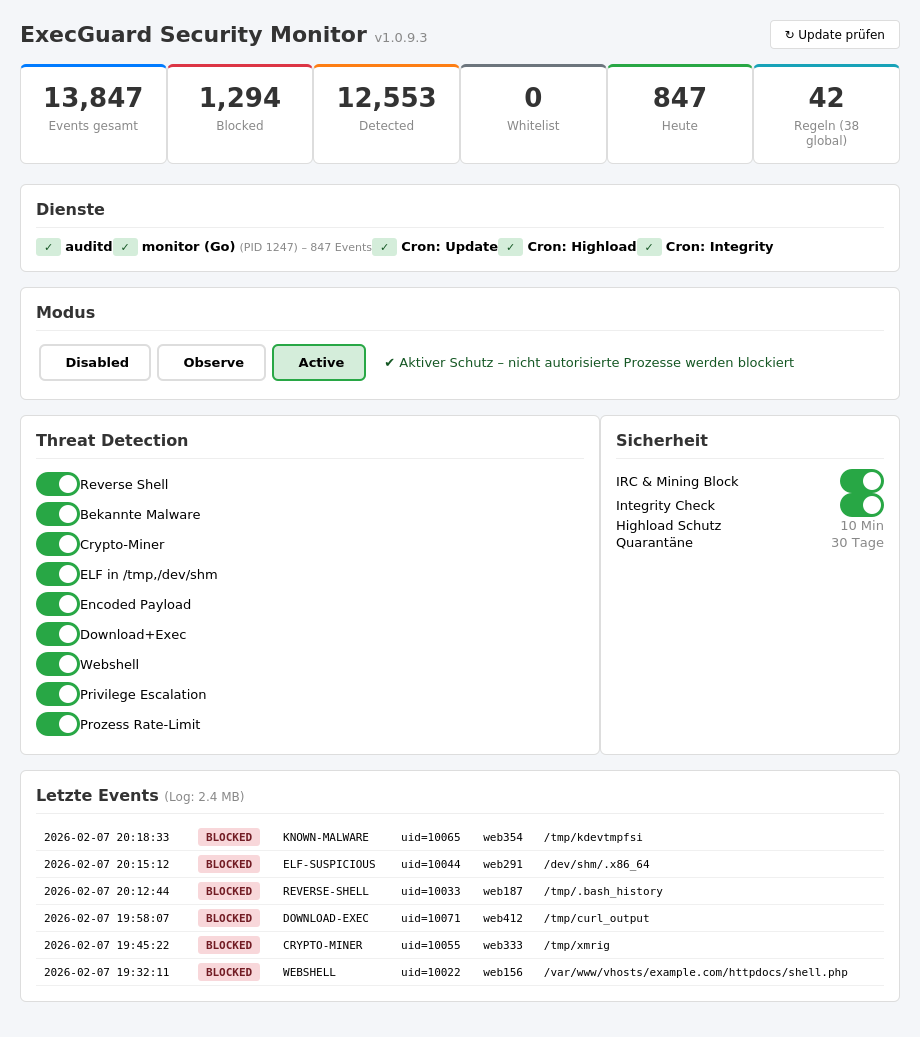
Every program execution on your server is monitored in real-time. Unauthorized processes are instantly detected and automatically terminated in Active mode.
Block Malicious Code Execution
Cryptominers, IRC bots, reverse shells and other malware are stopped immediately. Whether in /tmp, /dev/shm or a hacked web directory.
Central Management via Plesk
Configuration, whitelist and monitoring directly in your Plesk panel. No SSH required. All events centrally visible with email alerts for incidents.
Why does your server need ExecGuard?
On a standard server, any user can execute arbitrary programs: cryptominers, IRC bots, reverse shells, DDoS tools. A single hacked WordPress account is enough to compromise your entire server. Vulnerabilities are exploited daily — on Linux, tools land in /tmp; on Windows, in %TEMP% or Public directories. FireStorm ExecGuard protects both platforms.
Case Study 1 — Cryptominer via WordPress (Linux): An attacker exploits a vulnerability in an outdated WordPress plugin. They download an XMRig cryptominer as an ELF binary to /tmp and start it. The miner uses all CPU cores to mine Monero. Your server becomes extremely slow, CPU load hits 100%, and you only notice when customers complain. With ExecGuard: The miner is immediately blocked and terminated on startup — it cannot execute at all since /tmp is not a trusted path.
Case Study 2 — IRC Bot via Joomla Vulnerability (Linux): A vulnerable Joomla extension allows file uploads. The attacker uploads a Perl script that connects as an IRC bot to a command-and-control server. Your server becomes part of a botnet, sending spam or launching DDoS attacks. With ExecGuard: The Perl script is detected as an unauthorized execution and blocked. The IRC connection is additionally prevented at the firewall level.
Case Study 3 — ASPX Webshell on IIS (Windows): An attacker exploits a vulnerability in an ASP.NET application and places an ASPX webshell in the IIS directory. Through the webshell, they execute PowerShell commands, download Mimikatz and attempt to extract credentials. With ExecGuard: The suspicious process execution from the IIS context is immediately detected via Sysmon. The Mimikatz download is identified as a credential theft tool and blocked.
Case Study 4 — PowerShell Attack (Windows): An attacker gains access to a Windows server and launches an encrypted PowerShell reverse shell using "powershell -EncodedCommand". They then attempt to download additional malware via certutil or bitsadmin. With ExecGuard: Encoded PowerShell commands are immediately detected. The certutil/bitsadmin misuse as download tools is blocked. The reverse shell connection is prevented at the firewall level.
What makes ExecGuard unique? Traditional security solutions like malware scanners and web application firewalls work at the application level: they detect known signatures in files and filter suspicious HTTP requests. ExecGuard goes one step further and works directly at the operating system level. On Linux, ExecGuard monitors every execve() system call via the Audit Framework. On Windows, ExecGuard uses Microsoft Sysmon and ETW (Event Tracing for Windows) to monitor all process starts, network connections, and file creations. This means: regardless of how malicious code reached your server, and regardless of whether it is a known or completely new threat — as soon as an unauthorized program is started, ExecGuard intervenes. This approach optimally complements existing security solutions as an additional protection layer at the operating system level.
Linux Protection: Based on the Linux Audit Framework, ExecGuard monitors every single process start on your server in real-time. Only programs from trusted paths (/usr/bin, /opt/plesk, etc.) are allowed to execute. Everything else is immediately blocked in Active mode and the process is terminated.
Windows Protection: On Windows servers, ExecGuard uses Microsoft Sysmon for real-time monitoring. Every process start (Event ID 1), every network connection (Event ID 3), and every suspicious file creation (Event ID 11) is analyzed. Windows-specific attack vectors such as PowerShell abuse, ASPX webshells, certutil/bitsadmin downloads, credential theft tools (Mimikatz, LaZagne), and LOLBin abuse are specifically detected. The whitelist is adapted to Windows paths (C:\Program Files, C:\Windows, etc.).
What makes it special: ExecGuard also detects interpreter-based attacks. On Linux: bash and Python scripts from web directories. On Windows: PowerShell EncodedCommands, certutil abuse, and suspicious .NET executions. PHP applications like WordPress, Nextcloud and Laravel continue to work seamlessly on both platforms thanks to intelligent interpreter rules.
Advanced Threat Detection: ExecGuard includes specialized detection modules for both operating systems. Hidden process detection exposes processes with forged names. Reverse shells, webshells (PHP and ASPX), and encoded payloads are detected along with download-and-execute chains. On Windows, ExecGuard additionally detects: credential theft tools (Mimikatz, ProcDump, LaZagne), LOLBin abuse (certutil, mshta, rundll32), AMSI bypass attempts, Windows Defender tampering, and suspicious EXE/DLL files in temporary directories. The privilege escalation module detects sudo/su abuse on Linux and runas attempts and known exploit patterns on Windows. All modules work together to provide multi-layered protection.
IRC and Mining Blocking: On Linux, outgoing IRC and mining connections are blocked via iptables. On Windows, blocking is done through Windows Firewall (netsh advfirewall). Ports for IRC (6667-6669, 7000-7002) and known mining pools are blocked on both platforms.
Central management is done through your Plesk panel: manage whitelists, choose mode (Observe/Active), view logs and configure email alerts. Global rules are automatically synchronized to all servers — separately for Linux and Windows. A config fingerprint ensures that rules are correctly loaded on every server.
Unlike the commonly used "mount -o noexec /tmp" on Linux, ExecGuard causes no compatibility issues. Webmail (Roundcube, Horde), ExifTool, PHP installers and all regular server services continue to work flawlessly. ExecGuard selectively blocks only unauthorized executions instead of blanket-blocking an entire directory.
Requirements: ExecGuard supports Linux servers with Plesk Obsidian and Ubuntu 22.04 / 24.04 LTS as well as Windows servers with Plesk for Windows and Windows Server 2019 / 2022. Installation is automatic — on Linux through the Plesk panel, on Windows via a PowerShell script. Microsoft Sysmon is automatically installed and configured on Windows servers.
Maximum security with minimal resource consumption: ExecGuard is extremely resource-efficient. The optimized monitor uses less than 10 MB of RAM and causes CPU load of less than 0.1%. You won't even notice that ExecGuard is running in the background — your server's performance remains fully intact. Unlike conventional malware scanners that regularly scan the entire file system and generate significant load, ExecGuard works event-driven: it only becomes active when a process is actually started. This gives you real-time protection without any noticeable impact on your server performance.
Automatic Updates: ExecGuard updates itself automatically in the background. New detection rules, threat signatures and security improvements are rolled out regularly — without any manual intervention on your part. This keeps your server protected against the latest threats at all times.
FAQ
ExecGuard supports Linux servers with Plesk Obsidian and Ubuntu 22.04/24.04 LTS as well as Windows servers with Plesk for Windows and Windows Server 2019/2022/2025. Shared hosting is not supported — you need root or Administrator access. Microsoft Sysmon is automatically installed on Windows servers.
No. ExecGuard only monitors process executions at the operating system level. PHP websites (WordPress, Joomla etc.) run through PHP-FPM (Linux) or IIS (Windows) and are not affected. Cron jobs, Scheduled Tasks and CLI tools also work seamlessly thanks to configurable interpreter rules and whitelists.
In Observe mode, suspicious processes are only logged but not blocked. This allows you to first see what activities are taking place on your server before activating Active mode.
Yes. ExecGuard protects both platforms with platform-specific detection modules. On Linux, it uses the Audit Framework (auditd/execve); on Windows, Microsoft Sysmon and ETW. Whitelists, interpreter rules, and detection modules are each adapted to the operating system.
On Windows, ExecGuard detects: PowerShell EncodedCommands, ASPX webshells, credential theft tools (Mimikatz, LaZagne, ProcDump), LOLBin abuse (certutil, mshta, rundll32, bitsadmin), AMSI bypass attempts, Windows Defender tampering, suspicious EXE/DLL in temporary directories, and reverse shells via ncat/PowerShell. Outgoing IRC and mining connections are blocked via Windows Firewall.
On Linux, ExecGuard detects and blocks: cryptominers (XMRig, etc.), IRC bots, reverse shells (bash -i, nc -e, python), PHP webshells, unauthorized ELF binaries, suspicious shell scripts, encoded payloads, download-and-execute chains (curl/wget + chmod), fake thread detection (forged kernel process names), and privilege escalation (sudo/su abuse, linpeas). Outgoing IRC and mining connections are blocked via iptables.
Yes. ExecGuard works at a different level than most security products: directly at the OS level via the Linux Audit Framework or Windows Sysmon/ETW. It monitors every program start and complements existing solutions such as malware scanners, Windows Defender, or web application firewalls as an additional protection layer.
ExecGuard costs from CHF 9.90 per month with annual billing (or CHF 14.90 with monthly billing) as an addon to your existing FireStorm root server. For external servers, ExecGuard is available as a standalone product from CHF 24.90/mo. A one-time setup fee of CHF 50.- applies to monthly billing only — annual, 2-year and 3-year plans include free setup.
The traditional approach "mount -o noexec /tmp" prevents file execution in the /tmp directory, but causes numerous problems: webmail clients stop working, ExifTool breaks, various installers fail. ExecGuard works at the OS level and intelligently monitors every process start. It only blocks actually dangerous executions — while all regular services continue to work. On Windows, there is no equivalent to noexec — ExecGuard fills this gap with Sysmon-based process monitoring.